Seidr Awakening on the R36S
A real 3D game on a 3.5 inch handheld, with no internet at all. Copy one folder, add one launcher, find it in the Ports menu.
What you need
- An R36S (or a close clone) running ArkOS or a similar system with EmulationStation and a
/roms/portsfolder. - The SD card, and a computer that can write to it. Or a file transfer to the device, if you have set that up.
- Nothing else. The game loads SDL2 from the system and needs a glibc of 2.28 or newer; the console we test on has 2.30.
Prototype status. This is the same engine as the browser build, packaged by hand. It is not in the PortMaster catalogue yet; that is the goal for console release v0.9. It has been measured on one real R36S clone with a Mali-G31 GPU and a 1.5 GHz CPU. Other clones may behave differently.
Install in five steps
Download and unzip
Get SeidrAwakening-r36s-prototype.zip. Inside are the launcher
SeidrAwakening.shand a folder calledseidrawakeningwith the game.SHA-256:
see downloads/SHA256SUMSPut the SD card in your computer
Open the games partition. On ArkOS it is the one that holds the
romsfolders; on the device itself it appears as/roms.Copy both items into
portsYou should end up with these two paths:
/roms/ports/SeidrAwakening.sh
/roms/ports/seidrawakening/seidrspike
Make them executable, if needed
Copying from Windows can drop the executable flag. If the game does nothing when you launch it, open a terminal on the device (or an SSH session) and run:
chmod +x /roms/ports/SeidrAwakening.sh /roms/ports/seidrawakening/seidrspikeStart it from the Ports menu
Put the card back, boot, and open Ports in EmulationStation. If Seidr Awakening is missing, restart EmulationStation or update the game lists from the system menu.
The launcher
The Ports menu runs a script. Ours moves into the game folder and starts the game. If you want to make it yourself, this is the whole file:
#!/bin/sh
cd "$(dirname "$0")/seidrawakening" || exit 1
./seidrspike --game
The zip’s own launcher is the same, with a comment line. --game starts the playable game; without it the program runs the army sandbox.
What is in the folder
seidrspike- The game itself: a native ARM64 program, about 2 MB.
run_play.sh- An alternative launcher with the controls written in its header.
run_hashcheck.sh- Checks that your device calculates the game exactly as a PC does. Compare with
EXPECTED_HASHES.txt. run_bench.sh- A 30-second frame-rate and temperature test.
scripts/- Scripted scenarios used for testing.
Handheld controls, prototype build
These are the controls in the package you just installed. The full game’s layout is on How to play.
- Left stick
- Move the cursor.
- Right stick, D-pad
- Pan the camera.
- A tap
- Select the unit or your base under the cursor.
- A hold
- Paint-select: slide the cursor over units while holding.
- X
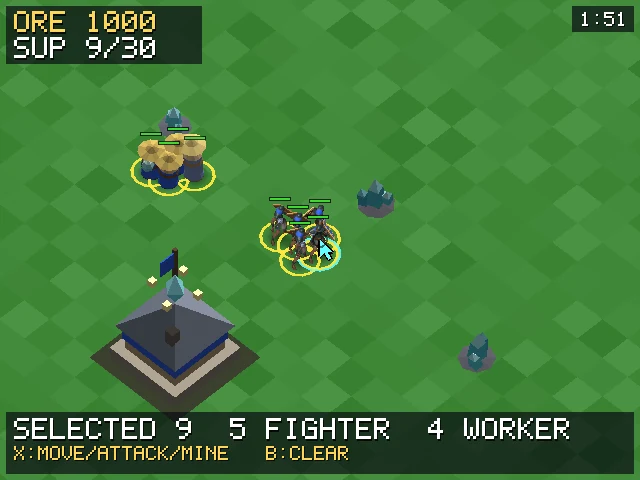
- Smart command: move on ground, attack an enemy, mine an ore node. With the base selected: train a Fighter (100 Ore).
- L1
- Select all your units on screen. With the base selected: train a Worker (50 Ore).
- Y
- Select the base and centre the camera on it.
- B
- Clear the selection.
- R1
- Zoom near or far.
- Start
- Quit. (In the full game, Start opens the pause menu.)
Goal
Destroy every enemy building and unit. Workers, the ones with the hats, mine ore crystals and carry them to your base. Train more workers and fighters from the base.
If your buttons are wrong
Some clones number their buttons differently. The launcher accepts an override, for example:
SEIDR_JOYMAP="a=0,b=1,x=2,y=3,l1=4,r1=5,start=7" ./run_play.shAdd --debug-input to the end to print every button the game sees.
How it runs
Measured on a real device, running the actual game code with models and animation. We say what we do not know too: both tests hit the 60 Hz panel limit, so we have not yet found the real ceiling.
Offline by design. There is no network code on the handheld. Seed codes, saves and replays are shared formats, so you can carry them to a browser or another handheld.
- 130 units
- 58.5 fpsworst frame 17.5 ms
- 400 units
- 58.4 fpsworst frame 17.5 ms
- Memory
- about 20 MBresident, of 512 MB
- Temperature
- 65 to 68 °Csustained