The basics, then the hands
Gather, build, advance an Age, break the other side. This page covers the game as designed, and the controls tell you plainly what the alpha can do today.
The loop
You start with a Foundry, five Masons and 300 Ore. The Masons mine, the Foundry makes more Masons, and you turn the money into an army before the other side does.
- Ore comes from nodes in the ground. A Mason carries ten at a time and walks it home. Three Masons per node is efficient; more help less.
- Aether comes from Wells, once you build a Conduit on one. A Well holds up to 800 and slowly refills, so Wells are worth fighting over.
- Lore is not mined. Archives and attuned Echo Sites produce it, and you spend it to enter the next Age.
- Supply limits your army. Foundries and Granaries raise it, and each Age raises the global cap by 25.
What a good first twelve minutes looks like
- Five Masons mining. The Foundry never stops making Masons.
- Eight Masons. First Granary, so you do not run out of supply.
- Glyph Barracks.
- Archive of Echoes, twelve Masons, a Conduit on the main Well.
- First Echo Site attuned. A second Foundry begins.
- The Normal AI attacks with about seven units.
- Age II reached. Weight Works placed.
- Age III. Ballistas and your first myth power.
Design benchmarks for the finished Hesh game, not tests of the prototype.
Fighting, and winning
Damage and armour
Every attack is Pierce (spears, maces), Blast (rams, siege) or Arcane (glyph light, casters). Every unit is Light, Armoured, Huge or a Structure. The numbers are percentages of normal damage.
| Damage | Light | Armoured | Huge | Structure |
|---|---|---|---|---|
| Pierce | 100 | 50 | 75 | 35 |
| Blast | 75 | 125 | 100 | 175 |
| Arcane | 100 | 100 | 150 | 50 |
Spears do little to armour. Rams and siege crack armour and buildings. Arcane light is good against giants. Who beats whom is on the Hesh page.
Four ways to win
- Conquest
- Destroy every key building: Foundry, Barracks and Weight Works. The default.
- Echo Dominion
- Hold at least 60% of the Echo Sites for four minutes in a row. The countdown is visible to everyone.
- Mythic Wonder
- Finish the Wonder of the Balance and keep it standing for five minutes.
- Anti-stall
- From minute 30, Wells begin to drain. At minute 45, Sudden Death: three minutes of warning, then the highest score wins.
You can always surrender. Online, surrender follows the commitment rules.
Controls
One set of commands, four ways to give them. Every device sends the same intents to the game, so nothing is lost on the handheld.
Alpha versus full game. Each tab starts with the controls the alpha has today (the same ones the game’s own help page lists). Underneath, a folded section holds the larger scheme designed for the finished game. The VR tab is design only.
This is what the alpha does today, in the browser and on a PC. Click the game once so it gets keyboard focus.
Select
- Left click
- Select a unit or building. Drag for a box; double-click selects every unit of that type.
- Ctrl+A
- Select everything of yours on screen.
- I
- Next idle Mason.
- L
- Select the army.
- U
- Select the hero.
- Ctrl+1-9
- Set a control group to the current selection. Shift+number adds to it.
- 1-9
- Recall that control group.
Order
- Right click
- Order: move, attack or mine. Hold Shift to queue it.
- A, then click
- Attack-move: fight whatever you meet on the way.
- S
- Stop.
- H
- Hold position (with units selected).
- V
- Patrol.
- Esc
- Back out: cancel a placement or target or close a menu. With nothing to cancel it opens the pause menu.
Build and train
- Mason: B
- Open the build menu, then Q Sun Granary, E Glyph Barracks, R Obelisk Tower. Click to place; Esc cancels.
- Foundry
- Q Mason, E Age up (the Rite), R Hero, F set the rally point, X undo the last queued item.
- Barracks
- Q Acolyte, E Sunspear Caster, R Seer, T Breaker, F rally point.
- Hero or Seer
- Q special ability, when it has the energy.
- Any soldier
- The command card shows Attack, Hold, Patrol and Stop with their keys. A button greyed out says why (not enough ore, needs a Barracks).
Camera, minimap and menus
- Arrows, WASD, screen edge
- Pan. With units selected, A and S are orders, so use the arrows or the edge.
- Mouse wheel, Tab
- Zoom.
- H or Space
- Jump to your base and select it (H only with nothing selected).
- F1-F4
- Jump to a saved camera position. Ctrl+F1-F4 saves one.
- Minimap
- Top right. Click or drag to move the camera; right-click to send the selection there. Your units are blue.
- M
- Show or hide the minimap.
- P or Esc
- Pause menu: resume, restart, game speed, settings, quit to menu.
Fog of war hides what your units cannot see; the minimap shows only what you have explored. Menus work with the mouse or the arrows, Enter and Esc. Settings (volume sliders, UI scale, colour-blind palette, edge scroll, game speed, minimap, key bindings) are saved in your browser. The Tutorial on the main menu walks through selecting, mining, building and fighting one prompt at a time.
Planned for the full game: the complete mouse and keyboard scheme
Select
- Left click
- Select a unit or building. Own units first.
- Drag
- Box select. Units win over buildings.
- Shift + click
- Add to, or remove from, the selection.
- Ctrl + click, or double-click
- Everything of that type on screen.
- F1
- Next idle Mason.
- F2
- Whole army, map-wide.
- F3
- Hero. Press twice to centre the camera.
- Tab
- Cycle the active unit type inside a mixed group.
- Ctrl+1-0
- Assign a control group. Shift+number adds.
- 1-0
- Recall a group. Press twice to jump the camera there.
Order
- Right click
- Smart order: move, attack, gather, repair, assist a building, or set a rally point.
- A, then click
- Attack-move: fight whatever you meet on the way.
- S
- Stop.
- H
- Hold position. Acolytes raise their shields.
- P, then click
- Patrol. Up to eight waypoints with Shift.
- Shift + any order
- Queue it after the current one (up to eight).
- Esc
- Back out: close a menu, cancel targeting, then clear selection.
Build and train
- Mason: B
- Basic build: Q Sun Granary, W Glyph Barracks, E Aether Conduit, R Obelisk Tower, A Glyph Wall.
- Mason: V
- Advanced build: Q Archive of Echoes, W Weight Works, E Wonder.
- Foundry
- Q Mason, W Hero, E Age up, R Repeat.
- Barracks
- Q Acolyte, W Sunspear Caster, E Jackal Rider.
- Weight Works
- Q Breaker, W Ballista, E Glider, R Ka-Ur.
- Shift + train key
- Queue five at once.
Camera and map
- Arrows, WASD, or the screen edge
- Pan. WASD pans in the prototype; in the full game A and S are order keys, so the final pan binding is still being settled.
- Mouse wheel
- Zoom toward the pointer.
- Middle drag
- Drag the world.
- Backspace
- Select and centre on your next Foundry.
- Space
- Jump to the latest alert; again for earlier ones (the last eight).
- Minimap
- Click to move the camera, right-click to order, Alt+click to ping.
The same buttons as the R36S handheld at 640 by 480. Connect a controller and press any button; the on-screen hint bar switches to whichever device you used last.
- Left stick
- Move the cursor.
- Right stick
- Pan the camera.
- A tap
- Select under the cursor. Also confirms in menus.
- A hold
- Paint-select: slide the cursor over units.
- X
- Order. With the base selected: train a fighter.
- L1
- Select the army on screen. With the base selected: train a worker.
- Y
- Select the base and open its command card.
- B
- Clear the selection; goes back in menus.
- R1 or Select tap
- Zoom near or far.
- R2 hold
- Queue: orders stack up instead of replacing.
- L2 + A/B/X/Y
- Recall control group 1 to 4. Add R2 to set the group instead.
- D-pad
- Jump to the latest alert, the next idle Mason, your base, your hero.
- Select hold
- Full-screen tactical map: A jumps there, X orders, Y pings. Release to close.
- Start
- Pause menu. In menus the D-pad or stick moves, A chooses and B goes back.
The minimap sits in the top right and fog of war hides unexplored ground, the same as on a PC. Bluetooth pads on a phone use the same scheme.
Planned for the full game: radial menu, stances and the full group set
Designed for the R36S at 640 by 480: two sticks, a D-pad, A B X Y, two shoulder buttons and two triggers. The grammar is tap versus hold, with triggers as modifiers: L2 for control groups, R2 for queueing.
- Left stick
- Move the cursor. It slows over units. Push into a screen edge to pan.
- Right stick
- Pan the camera.
- A tap
- Select under the cursor. Double-tap: all of that type on screen. Also confirms.
- A hold
- Paint-select: slide the cursor over units.
- B
- Cancel or go back. With nothing to cancel, clear the selection.
- X
- Smart order at the cursor: move, attack, gather, repair, set rally.
- Y
- Open the radial menu: eight slots for everything else. Stick picks, A confirms.
- L1
- Select the army on screen. Double-tap: the whole map.
- R1 tap
- Cycle the active unit type.
- R1 hold
- Attack mode: X attack-moves, A attacks a target. With the D-pad: up Stop, down Hold, left Patrol, right Stance.
- L2 + A/B/X/Y
- Recall groups 1 to 4. L2 + D-pad: groups 5 to 8.
- L2+R2 + button
- Assign the selection to that group.
- R2 hold
- Queue: orders and placements stack up instead of replacing.
- D-pad
- Up: last alert. Down: next idle Mason. Left: your Foundry. Right: your hero.
- Select
- Tap: zoom near or far. Hold: full-screen tactical map.
- Start
- Pause menu: resume, options, surrender, quit.
Building with a pad: Y, pick a building, move the ghost, X jumps to the next valid spot, A places. Bluetooth pads on a phone use the same scheme.
Landscape works best, ideally in full screen. Touch gets the same menus, minimap and pause menu as the other devices.
- Tap
- Select, and press the on-screen buttons, menus and the minimap.
- Drag
- Box select.
- Hold, or two-finger tap
- Order.
- Two-finger drag
- Pan.
- Pinch
- Zoom.
- Bottom bar
- Buttons for Base, Army, All and Clear, plus the command card for whatever is selected.
- Minimap
- Top right. Tap or drag to move the camera.
Planned for the full game: command card grid, group bar and toggles
Landscape only. Targets are at least 48 CSS pixels, and small units get a generous touch area.
- Tap
- Select. Tap again on the same spot to cycle through overlapping units.
- Drag
- Box select.
- Hold half a second, or two-finger tap
- Order.
- Two-finger drag
- Pan.
- Pinch
- Zoom.
- Double-tap
- All of that type on screen.
- Command card
- A 4 by 3 grid at the bottom right. The same buttons as the keyboard grid.
- Group bar
- Left edge. Tap selects, double-tap centres, long-press assigns.
- Queue and A-move buttons
- Toggles that arm the next tap, standing in for Shift and A.
- Minimap
- Bottom left. Drag to scrub the camera, long-press to ping.
The map is a table, one to one and a half metres wide, with units as small figurines. You stand or sit; the table moves, you do not. Planned for after phone and ranked.
- Ray and trigger
- Aim the controller ray; the trigger selects, or boxes when dragged on empty table.
- A (dominant hand)
- Smart order at the ray. B cancels.
- Off-hand trigger
- Queue.
- Grip
- Grab and move the table. Both grips: pinch to zoom and twist to turn it.
- Wrist panel
- The command card floats on your off-hand wrist. Poke or ray-select.
- Comfort
- No artificial movement. Interface sits at 0.6 to 1 metre. Seated and standing modes.
The first VR step is spectating replays and AI-versus-AI games as a diorama.
Screens you will meet
Menus, the minimap, fog of war, alerts, the pause menu, the tutorial and the result screen, as they look in the alpha today.
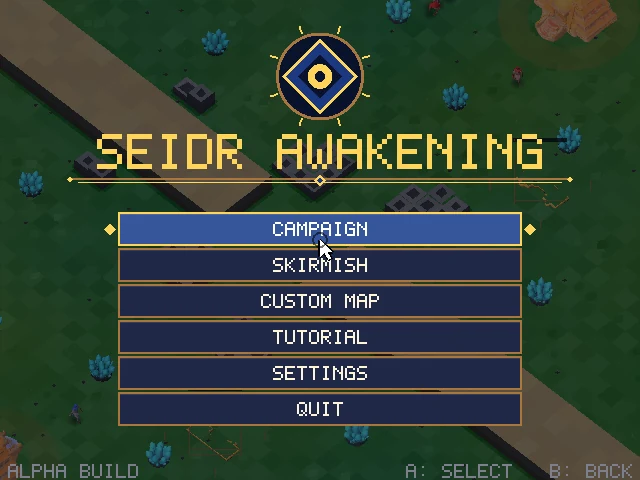
Main menuMain menu. Campaign, Skirmish, Custom map, Tutorial, Settings and Quit, usable with mouse, touch or gamepad. 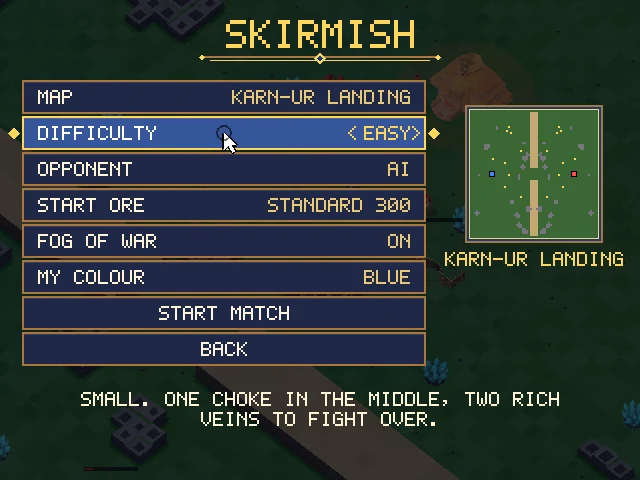
Skirmish setupSkirmish setup. Map, difficulty, start ore, fog of war and your colour; a seed code names the map. 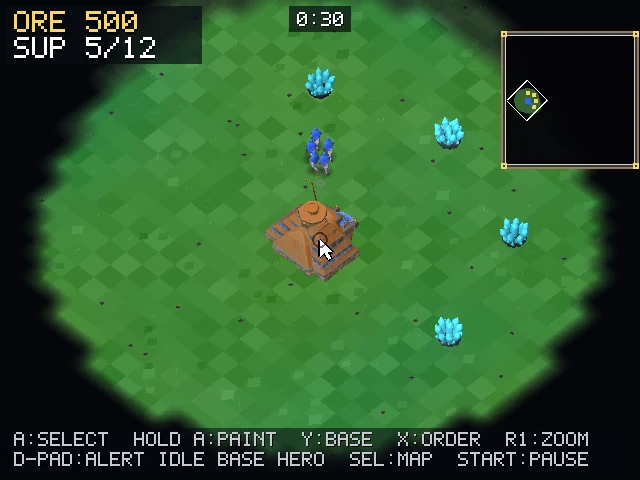
Fog of war and minimapFog of war and minimap, from the handheld build. Only ground your units have seen is lit; the minimap is top right. 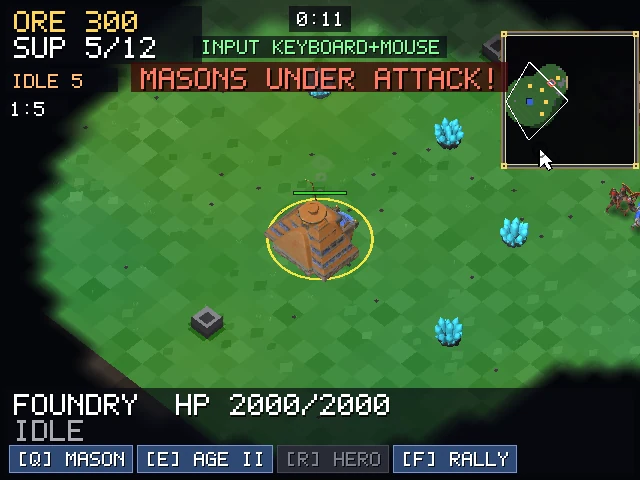
AlertsAn alert banner and a minimap flag when your Masons come under attack. On a gamepad, D-pad up jumps to the alert. 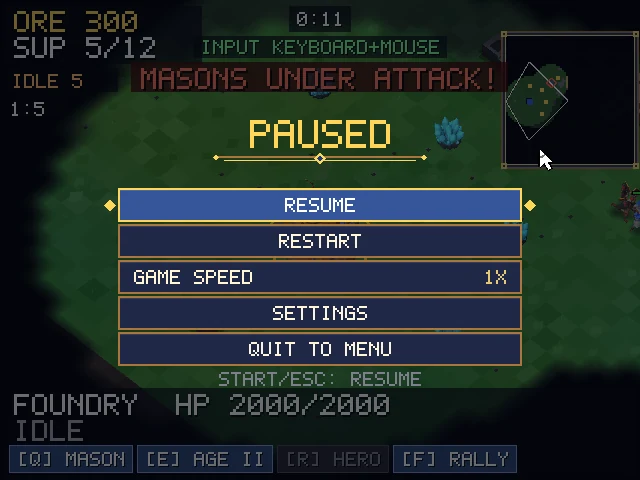
Pause menuPause menu. Resume, restart, game speed, settings and quit to menu: P or Esc, or Start on a pad. 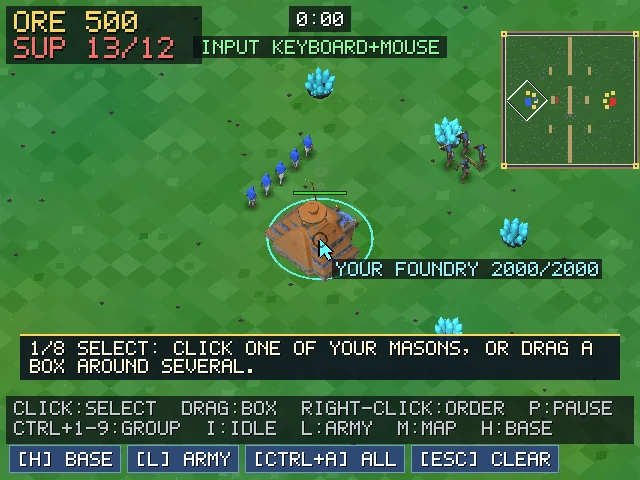
TutorialThe tutorial. A prompt at the bottom says what to do next, and moves on when you have done it. 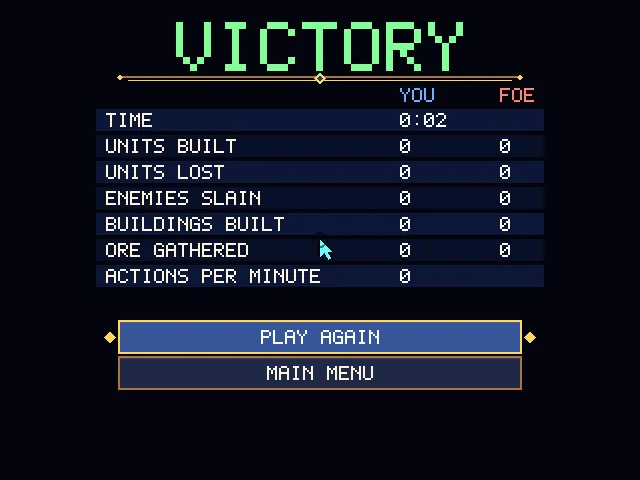
Result screenResult screen. Time, units built and lost, enemies slain, buildings, ore gathered and actions per minute. 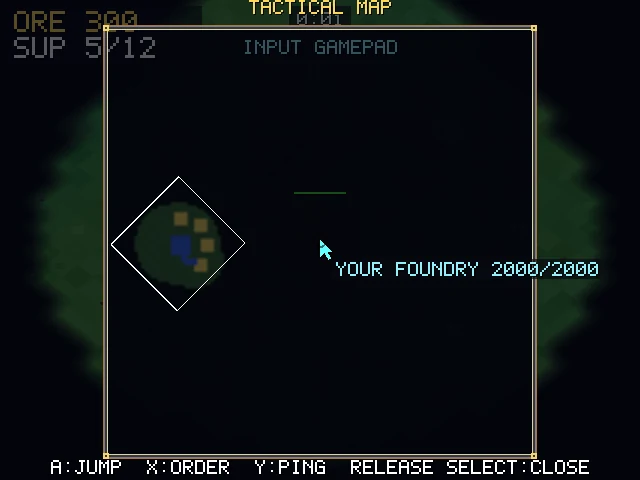
Tactical mapTactical map. On a gamepad, hold Select for a full-screen map: A jumps, X orders, Y pings.
Screenshots from the web and handheld builds. Play the alpha in your browser to see them for yourself.
Made to be reachable
- Full key remapping with conflict warnings, and the same for gamepads.
- A colour-blind-safe team palette. Teams also have banner shapes, never colour alone.
- Subtitles for every spoken line, with a size option.
- UI scale from 75% to 150% on PC and browser. Handheld text never goes below 14 pixels.
- Options to reduce camera shake and flashing, sticky modifier keys, and adjustable cursor speed.
These are targets from the UX specification; most are planned for the beta.