
Take it apart with your hands.
Three 3D scenes in your browser. Try them now with a mouse, trackpad or finger, or with Hand Control set to Hand Control demos / web 3D: pinch thumb and index to pick a part, pinch with both hands to turn the model.
The demos
Loading the 3D scene…
3D is not available in this browser
The demos need WebGL 2, which this browser or device has switched off or does not support. A recent Chrome, Edge, Firefox or Safari will run them. The gesture legend below still tells you which move does what.
The 3D view did not load
The files for the 3D scenes did not arrive, or did not start. A slow or blocked connection, or a browser extension, can cause this. Reload to try again. The gesture legend below works without it.
The 3D view did not load
The demos need JavaScript and WebGL 2. If both are switched on in this browser, reload the page. The gesture legend below works without them.
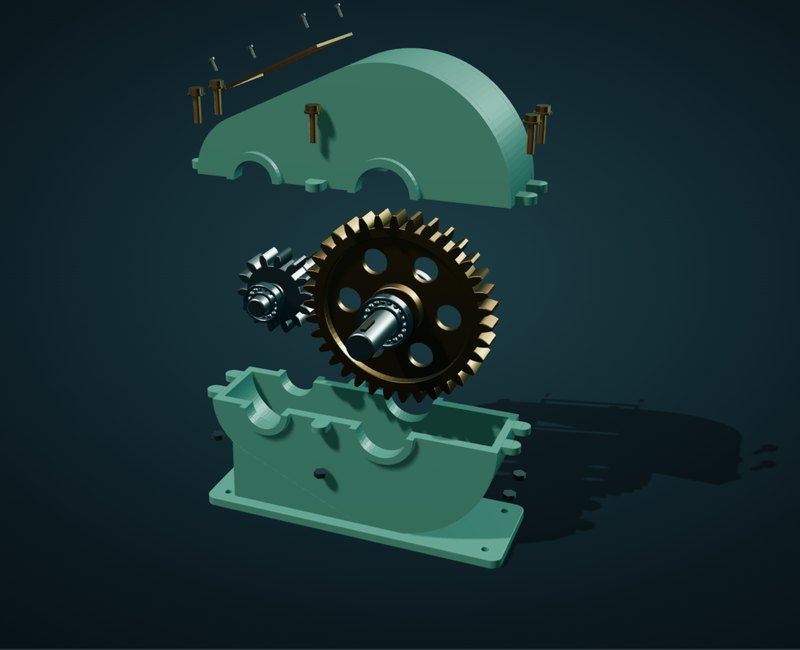
A single-stage gearbox
A 14-tooth pinion drives a 35-tooth gear, so the output turns 2.5 times slower with 2.5 times the torque.
No part selected
Click a part in the view, or choose one above, to see what it does.
An inline check valve
Water flows through one way. When the flow reverses, the spring pushes the disc back onto its seat and shuts the valve. Move the cut to see inside.
Gold hatching is the cast body where the cut goes through it. Grey hatching is the stainless disc.
Pick things up
Six shapes on a table, to pick up, carry, drop and spin. Click a shape to pick it up and click again to put it down, or hold the button and drag it. Double-click a shape to spin it. Drag the empty table to turn the view.
In Hand Control that is a pinch of thumb and index, or a pinch held while you move. Two quick pinches spin a shape.
Keyboard: with the view focused, keys 1 to 6 pick a shape, arrows move it, Space spins it and Esc lets go.
Touch: tap a shape to pick it up and tap where it should go, or drag it with one finger. Double-tap a shape to spin it. Drag the empty table to turn the view.
Keyboard: arrow keys turn the view, Shift and arrow keys move it sideways, plus and minus zoom, R resets the view.
Which move
does what.
The Hand Control column assumes its program is set to Hand Control demos / web 3D. The SolidWorks and Blender settings work the same way here. Fusion 360 and Onshape swap turning and panning in these demos, so switch to web 3D while you try them.
| Action | Your hands (Hand Control) | Mouse / touch |
|---|---|---|
| Rotate | Pinch with both hands and move both the same way sends middle-button drag | Left- or middle-drag one finger on touch, starting sideways in the gearbox and valve |
| Pan | Make two fists and move both the same way sends Ctrl + middle-drag | Right-drag, or Ctrl + middle-drag two fingers on touch |
| Zoom | Pinch with both hands and pull them apart or bring them closer sends the mouse wheel | Scroll wheel pinch two fingers on touch |
| Pick or drag a part | Pinch thumb and index; hold the pinch to drag sends a left click, or a held left button | Click; hold and drag tap or drag with one finger |
Keyboard: click or tab into the view, then use the arrow keys to turn, Shift and arrows to pan, + and − to zoom, and R to reset.
Touch: drag sideways with one finger to turn the gearbox or the valve; a straight swipe up or down scrolls the page. Two fingers move and zoom, and the buttons under the view tilt it. In the playground, one finger moves a shape; drag the empty table to turn the view.
Now try it
with your hands.
Set Hand Control to Hand Control demos / web 3D and the same scenes answer to a pinch.