Hand Control · free for Windows

Your hand
is the mouse.

Point to move the pointer. Pinch thumb and finger together to click. Make a V to scroll. Use both hands to turn and zoom a 3D model in SolidWorks, Fusion 360, Blender or Onshape. All it needs is an ordinary webcam, and everything happens on your own PC.

Hand Control runs on a Windows PC, so install it there. On this device you can try the 3D demos.

Download the Windows installer anyway (122 MB)

Free. No account, no sign-up.

Free download Windows 10 / 11 · 64-bit v1.2.5 No admin rights Any webcam
Try the idea here

Your pointer plays the hand

A browser sketch of what Hand Control does with your webcam. Move to point, press to pinch-click the glowing targets, and hold the pinch to drag one. Pick a gesture below the sketch to try the rest.

Sketch · a hand as 21 tracked points Control on
0 clicks

This sketch needs JavaScript. The gesture cards below show every pose.

Move Index finger up. Point and move your hand; press to pinch and click, hold the pinch to drag.

Keyboard: focus the sketch, move with the arrow keys and hold Space to pinch. The real app reads your hand through the webcam; this sketch reads your mouse or finger.

The gestures

One hand for the mouse,
two for 3D

Hold your hand up to the camera, palm towards it, and point. Prefer tapping a finger to click? Choose Finger tap under Gestures, Click style. See the settings window

Illustration: a hand drives the pointer A hand points and the pointer moves to a file in a window; a thumb and index pinch clicks it, two quick pinches open it, and a V sign scrolls the list. Projects › gearbox gearbox-assembly.sldasm1.8 MBoutput-shaft.sldprt344 KBbracket-v3.sldprt412 KBvalve-body.step2.1 MBgear-14t.sldprt508 KBgear-35t.sldprt977 KBcover-plate.dxf86 KBbearing-6204.step731 KB bracket-v3.sldprt
  1. Point to move
  2. Pinch to click
  3. Pinch twice to open
  4. V sign to scroll
Index finger up

Move

Point and move your hand. Slowly for precise work; a quick sweep crosses the whole screen.

Thumb and index pinch

Click, double-click, drag

Touch thumb and index fingertip to click, twice quickly to double-click. Hold the pinch and move to drag.

Thumb and middle pinch

Right-click

Touch thumb and middle fingertip together. Your index finger can stay pointing.

V sign

Scroll

Hold up index and middle finger in a V and move your hand up or down.

Open hand

Reposition

Open your hand wide. The pointer stays put while you bring your hand back to the middle.

Rock sign, one second

On and off

Hold up index and little finger for a second. Ctrl+Alt+H does the same.

Two hands, for 3D

Rotate, zoom, pan

Pinch with both hands and move both the same way to rotate a model. Pull them apart or bring them closer to zoom. Make two fists and move both the same way to pan.

A gearbox drawn in 3D, pulled apart: the housing halves, gears, shafts, bearings and bolts float apart along their own axes
3D programs

Set up for SolidWorks, Fusion 360, Blender and Onshape

Each program turns and moves the view with different mouse buttons. Pick yours under Gestures, and your two hands send the buttons and keys its maker lists as defaults. Tested so far with recorded hand movements, not yet with real hands. Most other programs work with the one-hand gestures, except those run as administrator.

What each program receives

Zoom is the mouse wheel in every program.

ProgramRotatePan
SolidWorksMiddle-dragCtrl + middle-drag
Fusion 360Shift + middle-dragMiddle-drag
BlenderMiddle-dragShift + middle-drag
OnshapeRight-dragMiddle-drag
The web demosMiddle-dragCtrl + middle-drag

Each program’s default mouse settings, checked against what its maker publishes. Sources

Privacy Camera Your PC Internet

Hand Control uploads nothing

  • Camera images are processed on your PC; Hand Control never uploads or saves them. A snapshot goes to an AI agent only if you tick that, and may go on to its service.
  • Only follow my hands learns your face once and ignores everyone else’s hands; the camera must see your face and shoulders. It keeps a 128-number signature, not a photo.
  • No account, no tracking. It goes online only for updates (checked by SHA-256 before they install) and a network camera you type in.
AI agents

Let Claude see your gestures

AI agents such as Claude can read your gesture, where your hands are, and each click, key and scroll Hand Control sends. Ask one to wait for a gesture or set up your program.

  • Off until you switch it on. Programs on this PC only, and every data request needs the access key; never web pages.
  • Agents cannot start any mouse or keyboard input. Switching control or the 3D program, and snapshots, need your tick.
  • Two buttons copy the setup for Claude Code or Claude Desktop; the MCP connector comes with the app.
Get it running

Install in a few minutes,
no admin rights

Install, look around the app, fix the usual snags, and read what changed in each version.

Install

  1. DownloadRun HandControl-Setup and choose Install for me only, which needs no administrator password.
  2. If Windows warns youThis free build is not code-signed yet, so SmartScreen may say it “protected your PC”. Choose More info, then Run anyway.
  3. StartOpen Hand Control, pick your webcam, and turn control on.
Needs
Windows 10 or 11, 64-bit, any USB or built-in webcam
Version
1.2.5, 122 MB
SHA-256
d1a5f1cf77dd4512b1ae36c7eac6742eabff38f95d693b921a693d0cd0bf47c4

To check the file, run this in PowerShell in your Downloads folder. The Hash it prints must match the SHA-256 above; PowerShell prints it in capitals, and case does not matter.

Get-FileHash .\HandControl-Setup-1.2.5.exe
Download for Windowsv1.2.5 · 122 MB · Windows 64-bit

For a Windows PC: open this page on your computer to install.

Download the Windows installer anyway (122 MB)
The app

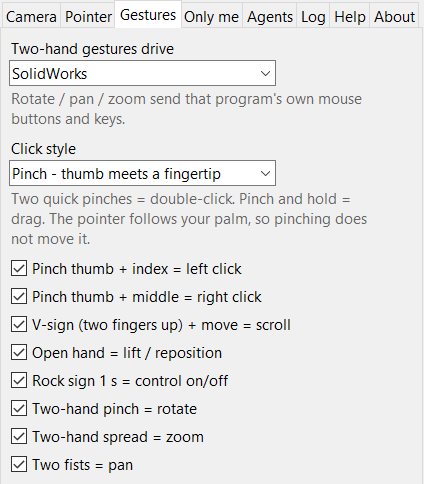
The Gestures tab of Hand Control: two-hand gestures drive SolidWorks; click style Pinch, thumb meets a fingertip, with a note that two quick pinches double-click and pinch and hold drags; ticked switches for pinch thumb and index left click, pinch thumb and middle right click, V sign and move to scroll, open hand to lift and reposition, rock sign for one second to switch control, two-hand pinch to rotate, two-hand spread to zoom and two fists to pan
Gestures tab: the program your two hands drive, the click style, and a switch for each gesture.
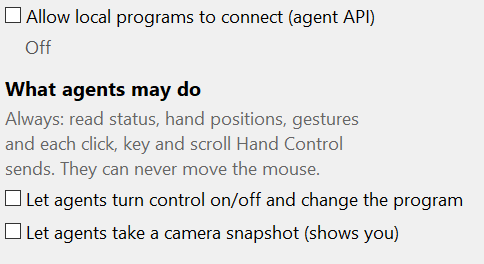
Part of the Agents tab in Hand Control 1.2.5: Allow local programs to connect is unticked and reads Off; agents may always read status, hand positions, gestures and each click, key and scroll Hand Control sends, and can never move the mouse; switching control and taking a camera snapshot are both unticked
Agents tab: everything off until you switch it on.

Troubleshooting

Light
Light your hands from the front. A bright window behind you turns them into dark shapes the camera cannot follow.
Distance
Sit 50 to 80 cm from the camera. Further back, choose 1280×720 in the Camera tab for finer detail.
Clicks too easy or too hard
Under Gestures, Tuning: Click when closer than and Release when apart by (Pinch style), or Click when bent below and Release when above (Finger tap).
Camera busy
If the preview stays empty, another app (a video call, Windows Camera) has the webcam. Close it; Hand Control picks it up within about 20 seconds.
Nothing happens in one program
That program was started as administrator, and Windows does not let ordinary programs control it. Start it normally, or run Hand Control as administrator too.
Only follow my hands
The camera must see your face and shoulders; if it cannot, Hand Control ignores every hand rather than guess.
Control off at once
Press Ctrl+Alt+H, or hold up the rock sign for a second. The same again turns it back on.
Tested on
A Logitech C270 at 30 fps on an AMD Ryzen 9 3900: hand tracking takes about 21 ms a frame on the processor alone.
Remove
Windows Settings, Apps, Hand Control, Uninstall. It offers to delete your settings, logs and face signature too.

Release notes

Version 1.2.5, September 2026

  • The Agents tab and the included Claude connector now say plainly that a connected agent can also see each click, key press and scroll Hand Control sends, not only your hand positions and gestures. Nothing else changed.

Version 1.2.4, September 2026

  • The included Claude connector describes the pinch gestures, lists every gesture name it can report, says when a camera snapshot shows the tracked hands, reports a busy Hand Control as busy, and follows the caching rules of the current MCP revision (2026-07-28). Versions 1.2.1 to 1.2.4 changed only the connector and the wording of one message agents receive.
Earlier versions

Version 1.2.0

  • Click by pinching: thumb and index for a click, twice for a double-click, hold to drag; thumb and middle for a right-click; a V sign to scroll. The finger-tap gestures stay available as a setting.
  • Click pinches are measured in 3D against the size of your own hand, so they work near or far and with the hand turned, and a thumb that only looks as if it touches is not a click.
  • The pointer holds its place while your fingers close, so a click lands where you aimed.

Version 1.1.0

  • Two-hand gestures fit your 3D program: SolidWorks, Fusion 360, Blender, Onshape or the web demos.
  • AI agents such as Claude can connect through a local, off-by-default agent API and an included MCP connector.
  • Every release is built from one recorded source revision (shown under About), with the licences of all open-source parts inside.

Version 1.0.0

  • Pointer, clicks, drag, scroll, reposition, on and off, two-hand rotate, zoom and pan, and Only follow my hands.

Hold up a hand.
Take the pointer.

Free for Windows 10 and 11. No account, no sign-up, and nothing uploaded.

A Seidr Labs project · Free State, South Africa